|
|||
|
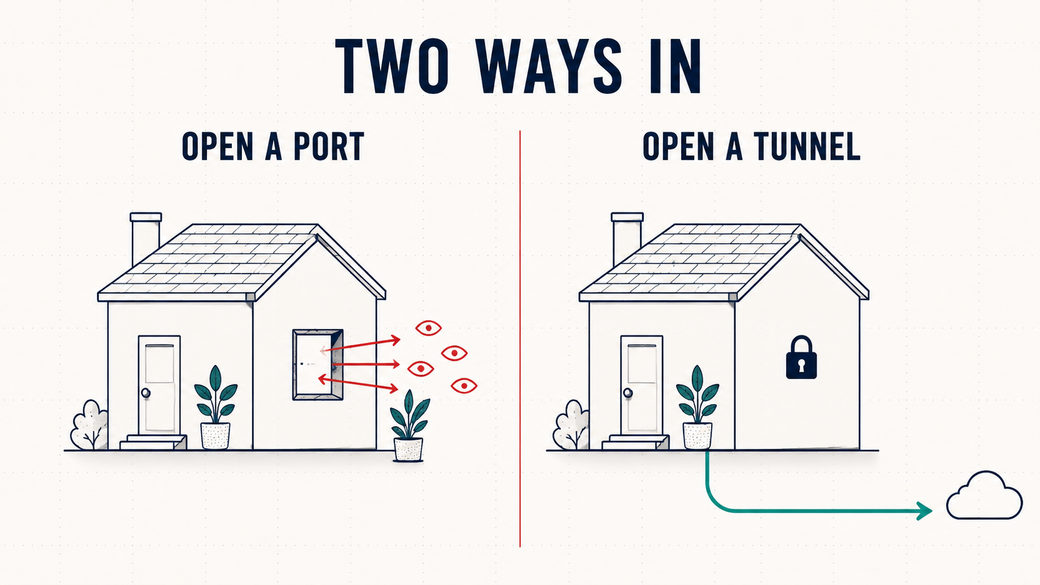
You can just publish thingsLast time I talked you into giving an old laptop a job. If you went and did it, there is a real application running on hardware you own right now. And you can only use it by walking over to it. That's the wall everybody hits second. The app answers at Without opening a single port on your router. Whatever you do, don't open a portEvery guide written before about 2018 tells you to set up port forwarding — telling your router to let outside traffic in. Don't. It puts your home network directly on the public internet, where automated scanners will find it within hours. It breaks every time your provider rotates your IP. There's no HTTPS, so you'd be typing a password in the clear. And if you're behind CGNAT, as more and more of us are, it doesn't work at all. Turn the connection around insteadThe fix is a Cloudflare Tunnel, and the idea behind it is genuinely lovely: instead of the internet reaching in to your server, your server reaches out to Cloudflare and holds that connection open. Visitors arrive at Cloudflare, and their requests ride back down the pipe your machine already opened from the inside. Nothing ever connects inward. Your router's inbound ports stay exactly as closed as they are today — and you get a valid TLS certificate thrown in for free.
The twenty-minute versionCreate a tunnel in Cloudflare's Zero Trust dashboard, copy the token it hands you, and run this on the machine your app lives on:
Put the token in a Then open it from your phone, on mobile data, off your home wifi entirely. That's your app. Do not skip this part. Your app is now on the public internet, and plenty of self-hosted tools ship with no login at all. Add a Cloudflare Access policy in front of it — action Allow, rule Emails, your own address. It takes ninety seconds and it's free for up to 50 users. The bit that cost me an afternoonIf you create your tunnel in the dashboard, it is remotely managed: the routing config lives at Cloudflare and it silently overrides the config file on your own machine. You can edit that file, restart the container, watch it come up perfectly clean — and nothing changes. No error. No warning. The only tell is one line in the logs:
That's cloudflared telling you it just took its instructions from Cloudflare, and that your file is decorative. Make the change in the dashboard instead. The full walkthroughThe post has the whole thing end to end: the one line in that compose file that trips up almost everybody, the three causes of a 502 in the order you should check them, why you type → Read: You Can Just Publish Things Is this too deep, too fast?Two issues in, and I've gone from "plug in the old laptop in your drawer" to "run a tunnel daemon and put an identity check in front of it." That escalated quickly. From in here I genuinely can't tell whether that's the right pace or whether I've already lost half of you. So this one's a real question, and I'd love an answer. Hit reply with a word:
Every reply comes to my actual inbox and I read every one. And if you did get a tunnel working, tell me what you put behind it — I'm always curious what people choose to publish first. Talk soon, |
|||
|
Enjoying this? If you think someone else would find it useful, forward it their way — they can subscribe at abidc.dev. |